How do you let a user search Apache Cassandra®
5.0 by typing what a movie is about, in their own words? Embed their question
with the same model that embedded the plots, then ask Cassandra for the nearest
vectors with ORDER BY ... ANN OF ... LIMIT. This post builds that into one
FastAPI endpoint, which is a URL that your
app answers, such as /movies/semantic.
This is the fourth instalment in the Cassandra 5.0 series where I’ll show you how to build an AI movie recommender app with Python and TypeScript.
What you’ll learn and what you need
You’ll learn:
- how to embed a search phrase at request time,
- how to run
ANN OFfrom Python with a bound vector, - why a vector query needs its own consistency level, and
- what the endpoint should do when Google says no.
We’ll continue to use the same Astra
DB
and the movies table from week 3, with
every plot embedded and the vector index built.
For full disclosure, I’m an Apache Cassandra committer and a Developer Advocate at DataStax, now an IBM company. We’re using Astra DB for convenience so you can focus on building apps as a developer without worrying about how to install or configure a cluster, but the examples in this post are verified to run on Cassandra 5.0.
You also need Python 3.10 or later, the virtual environment from the series
setup
page
and your GEMINI_API_KEY in the .env file, the Google AI Studio key from
section 3 of the setup
page.
Every search
we run this week sends one phrase to Gemini, so the same note about Google’s
terms applies: only type phrases you’d
be happy for Google to see.
Where keyword search comes up empty
In week 2, we gave cMovie a search that finds “wick” because the word is in a title. Let’s see what it does with a question a real user might ask, “heist”, using week 2’s endpoint. With week 2’s app running, run this in a second terminal window:
curl -s -G http://127.0.0.1:8000/movies/search \
  --data-urlencode "title=heist" | python -m json.tool

{
    "results": []
}
No title contains the word, so nothing comes back, even though the table is full of movies about heists. Keyword search only matches words, not meaning.
In week 3, we searched by meaning, but it took 2 manual steps. We ran a helper script in a terminal to turn each phrase into a vector, then pasted the statement it printed into the Astra CQL console, the page in Astra DB where you type Cassandra Query Language (CQL) statements. A real user can’t do either of those, so this week the app does that work for them.
Embed the question, then ask Cassandra
A quick recap from week 3. An embedding is a list of numbers that captures what
a piece of text means, and texts with similar meanings get numbers that sit
close together. The loader stored one for every movie plot in the
plot_embedding column, which is a vector, a fixed-length list of 3,072
numbers. A search by meaning is a search for the plots whose numbers sit
closest to the question’s numbers.
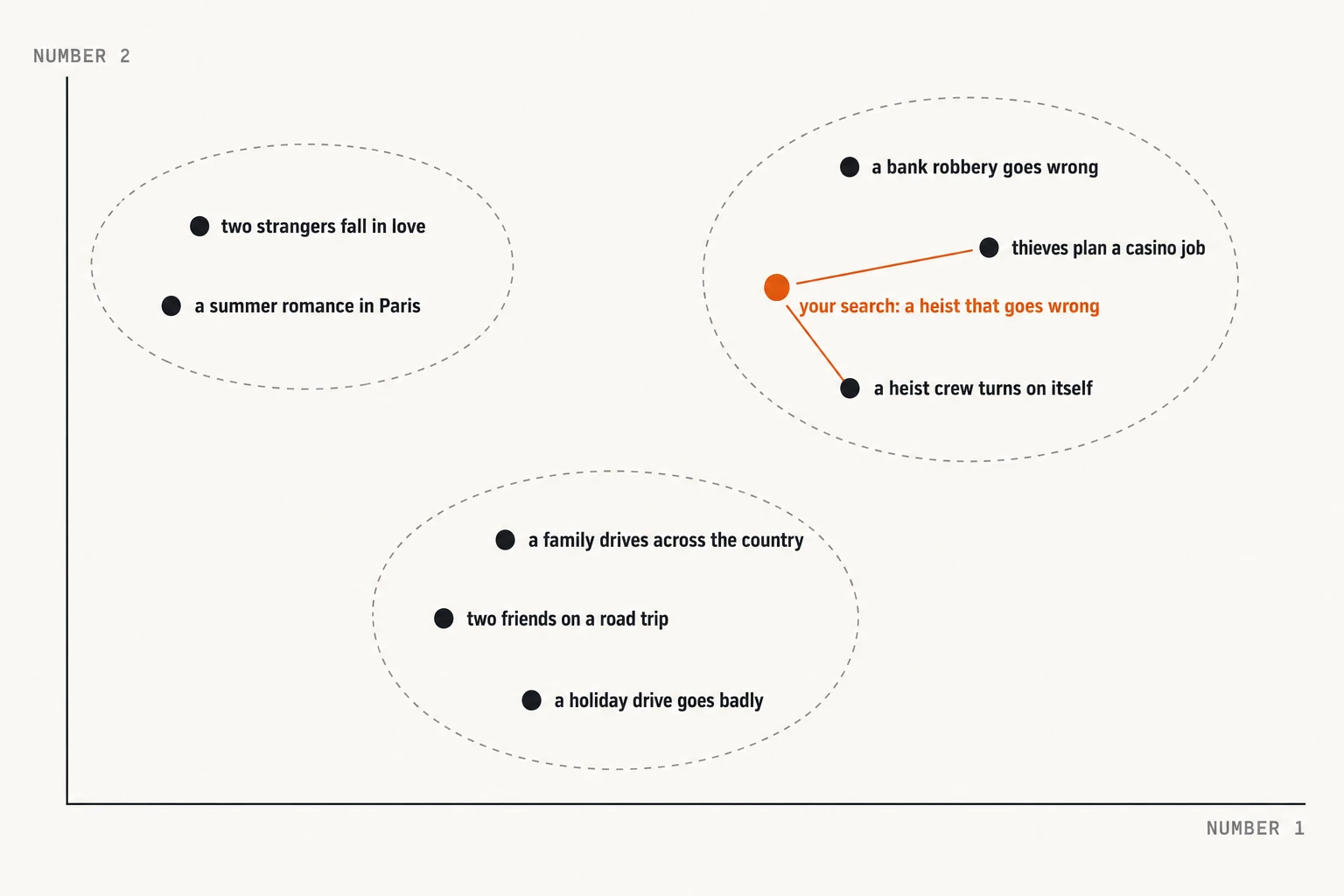
An illustration, not real data. Each phrase here gets 2 numbers, where
gemini-embedding-2 gives it 3,072, but the idea is the same: phrases with
similar meanings sit close together, and a search finds its nearest
neighbours.
A semantic search takes 2 steps for every request:
- Send the user’s phrase to Gemini’s
gemini-embedding-2model and get back 3,072 numbers. - Ask Cassandra for the movies whose
plot_embeddingis closest to those numbers.
ANN stands for approximate nearest neighbour: the index finds very close
matches without comparing your query with every vector.
The first step must use the model that embedded the plots, which is why the loader and the API make the same Gemini call. The loader sent 100 plots at a time and the API sends one phrase.
Info
Vector indexes are experimental in Cassandra 5.0. Storage Attached Index (SAI) vector indexes are not recommended for production use yet, and they have restrictions, some of which we meet at the end of this post. Astra DB doesn’t print the 5.0 warning, but the restrictions behind it apply there too. Week 9 compares 5.0 and Astra DB in full.
The query
This is the CQL statement the API runs. The vector and the LIMIT are bind
markers, the ? placeholders in the statement. We write the statement once,
and the driver fills in the placeholders with new values for each request:
SELECT title, release_year FROM movies
ORDER BY plot_embedding ANN OF ? LIMIT ?
Week 3 pasted a 37 KB vector into the console. Here, the Python driver takes a plain list of floats and sends it with a prepared statement. A prepared statement is sent to the server once, when the app starts, and the server parses it and keeps it. After that, each request sends only the values for the placeholders, so the server doesn’t parse the statement again and the app never turns the vector into 37 KB of text.
There’s one more setting that vector queries need. Cassandra keeps more than one
copy of your data, each on a different server, called a replica. The
consistency level tells Cassandra how many replicas must answer before a read
or write counts as done. ONE means one replica, and LOCAL_QUORUM means a
majority of the replicas in the local data centre. Vector queries can only be
read at consistency level ONE or LOCAL_ONE, and the connection
code
the loader and the apps share defaults to LOCAL_QUORUM, which is the right
level for writes on any cluster. Week 3’s query ran anyway, because Cassandra
quietly downgraded it and added this warning, which the driver receives too:
Top-K queries can only be run with consistency level ONE / LOCAL_ONE / NODE_LOCAL. Consistency level LOCAL_QUORUM was requested. Downgrading the consistency level to LOCAL_ONE.
Rather than rely on a downgrade, the statement asks for ONE itself. I tried
ONE and LOCAL_ONE on the statement and neither one produced a warning.
One app for every week
From this week, the app lives in one place,
app/main.py,
and each build week adds an endpoint to it. Week 2’s endpoint, the keyword
search on /movies/search, is copied in unchanged. The old
tutorials/week-02/app.py stays where it is, so week 2’s post still works. That
script put the tools folder on Python’s import path with a sys.path line, so
it could import connection directly. The shared file doesn’t need the line,
because we run it from the root of the repo, where Python can import
tools.connection.
Here’s what’s new in app/main.py, with week 2’s endpoint left out:
import math
import sys

from cassandra import ConsistencyLevel
from fastapi import FastAPI, HTTPException, Query

from tools.connection import DEFAULT_ENV_PATH, build_config, connect, load_env
from tools.embeddings import (
    DailyLimitReached,
    EmbeddingError,
    RateLimited,
    embed_texts,
)

cluster, session = connect(build_config())
GEMINI_API_KEY = load_env(DEFAULT_ENV_PATH).get("GEMINI_API_KEY")
if not GEMINI_API_KEY:
    sys.exit(f"GEMINI_API_KEY isn't set in {DEFAULT_ENV_PATH}. See section 3 of docs/setup.md.")

# Prepared once, with the query vector and the LIMIT as bind markers.
ANN_QUERY = session.prepare(
    "SELECT title, release_year FROM movies ORDER BY plot_embedding ANN OF ? LIMIT ?"
)
ANN_QUERY.consistency_level = ConsistencyLevel.ONE

app = FastAPI()
The app connects through tools/connection.py, the helper the loader uses too,
so it runs on Astra DB or on your own 5.0 cluster, depending on your .env
file. I ran this week’s app on both.
The endpoint
The endpoint does 3 jobs:
- It embeds the phrase with Gemini.
- It runs the prepared query with the resulting vector.
- It turns Google’s failures into HTTP error codes so the caller knows what
went wrong. Those codes are standard numbers that every web client
understands.
429means “too many requests, slow down”, and502means a service behind the app, Gemini in this case, failed.
Here it is:
@app.get("/movies/semantic")
def semantic_search(
    q: str = Query(min_length=1, max_length=500),
    limit: int = Query(5, ge=1, le=1000),
):
    try:
        (vector,) = embed_texts(GEMINI_API_KEY, [q], retry=False)
    except DailyLimitReached as e:
        raise HTTPException(
            status_code=429,
            detail=f"Gemini's free tier limit for today is used up: {e}",
        )
    except RateLimited as e:
        raise HTTPException(
            status_code=429,
            detail="Gemini is rate limiting this key, try again shortly",
            headers={"Retry-After": str(math.ceil(e.retry_after))},
        )
    except EmbeddingError as e:
        raise HTTPException(status_code=502, detail=str(e))

    rows = session.execute(ANN_QUERY, (vector, limit))
    return {"results": [row._asdict() for row in rows]}
There are 3 things worth knowing:
- The typed parameters do the validating. FastAPI rejects an empty phrase,
or a
limitoutside 1 to 1,000, before the handler runs. We’ll see why that range matters in a moment. - The handler is a plain
def. The driver’ssession.execute()blocks, which means it holds up the code until the database answers. FastAPI runs a plaindefhandler on a separate worker thread, so while one request waits for the database, other requests keep moving. retry=Falseis new. The loader’sembed_texts()helper waits and tries again when Google answers HTTP 429, which suits a loader that can wait a minute, but not a web request. I added aretryflag totools/embeddings.pyso the API fails straight away and tells the caller why. The loader still waits as before.
The endpoint returns titles and release years only, so we never show plot text and there’s nothing to attribute.
Try it
Grab the popcorn, it’s time for the screening. Let’s run the app with Uvicorn, the web server that runs FastAPI apps. If week 2’s app is still running, stop it first with Ctrl+C, because both apps use port 8000. Open a terminal in the root of the repo, the folder you cloned in the setup page, activate your virtual environment, then run:
uvicorn app.main:app --reload
Leave it running. You need to start it from the root of the repo, because
app.main is a path from there. If you start it from another folder, it stops
with this error:
ModuleNotFoundError: No module named 'app'
You can open http://127.0.0.1:8000/docs in a browser, where FastAPI generates
a page for trying each endpoint without assembling a curl command. In this post,
we’ll use curl in a second terminal window. Let’s start with the phrase that
found nothing a minute ago, “a heist that goes wrong”:
curl -s -G http://127.0.0.1:8000/movies/semantic \
  --data-urlencode "q=a heist that goes wrong" | python -m json.tool

{
    "results": [
        {
            "title": "Snatch",
            "release_year": 2000
        },
        {
            "title": "Speed",
            "release_year": 1994
        },
        {
            "title": "Heat",
            "release_year": 1995
        },
        {
            "title": "Dumb and Dumber",
            "release_year": 1994
        },
        {
            "title": "Ocean's Thirteen",
            "release_year": 2007
        }
    ]
}
Compared to week 2’s empty result, we get five movies, and none of them has “heist” in the title. The results are ordered by closeness of meaning, nearest first, and the search is approximate, so judge the edges of a list for yourself.
Let’s try a phrase that has no keyword in common with any title, “a family road trip that goes sideways”:
curl -s -G http://127.0.0.1:8000/movies/semantic \
  --data-urlencode "q=a family road trip that goes sideways" \
  | python -m json.tool

{
    "results": [
        {
            "title": "Little Miss Sunshine",
            "release_year": 2006
        },
        {
            "title": "Marvin's Room",
            "release_year": 1996
        },
        {
            "title": "Dumb and Dumber",
            "release_year": 1994
        },
        {
            "title": "Thelma & Louise",
            "release_year": 1991
        },
        {
            "title": "The Fast and the Furious: Tokyo Drift",
            "release_year": 2006
        }
    ]
}
The limit parameter sets how many movies you get back. Compared to the last
call, here are just the nearest 2:
curl -s -G http://127.0.0.1:8000/movies/semantic \
  --data-urlencode "q=a family road trip that goes sideways" \
  --data-urlencode "limit=2" | python -m json.tool

{
    "results": [
        {
            "title": "Little Miss Sunshine",
            "release_year": 2006
        },
        {
            "title": "Marvin's Room",
            "release_year": 1996
        }
    ]
}
A request takes around 1.3 seconds on my laptop. Your time will differ with your network. Each search also uses one text from your free tier allowance, which matters in a moment.
Insert your embedding model here
You don’t have to use Gemini, as long as you keep 2 things in step:
- The dimension is part of the schema.
vector<float, 3072>only holds 3,072 numbers, so a model with a different size means a new column and a new index. - The query model must match the load model. The API has to embed each phrase with the model that embedded the plots.
To swap models in this app, change the import and the embed_texts() call in
semantic_search, then change the column, the index and the loader, and
re-embed every movie. Note that “same size, different model” is the dangerous
case. It doesn’t raise an error. It just quietly returns poor results to your
users.
The gotcha: the day’s allowance runs out
Here’s how this goes wrong for a real reader. You run the loader from scratch,
which sends all 1,000 plots to Gemini and can use up your free tier’s whole
daily allowance. Then you open /docs and search. Google refuses, and the
endpoint says so instead of hanging or crashing:
curl -s -i -G http://127.0.0.1:8000/movies/semantic \
  --data-urlencode "q=a heist that goes wrong"

HTTP/1.1 429 Too Many Requests
date: Fri, 02 Oct 2026 12:47:11 GMT
server: uvicorn
content-length: 300
content-type: application/json

{"detail":"Gemini's free tier limit for today is used up: You exceeded your current quota, please check your plan and billing details. For more information on this error, head to: https://ai.google.dev/gemini-api/docs/rate-limits. To monitor your current usage, head to: https://ai.dev/rate-limit. "}
I got this by using up my own allowance on purpose. The message comes from
Google, and the 429 is the endpoint’s. Google also limits how fast you can
send. When that happens, the endpoint answers 429 with a Retry-After header
that says how many seconds to wait. Your limits may differ from mine, so check
them on the Rate Limit page in Google AI
Studio. Once your allowance resets, the same call
works again.
Another gotcha: a LIMIT is mandatory
ANN OF needs a LIMIT, and by default Cassandra 5.0 caps it at 1,000. Here
are the 2 ways Cassandra says so. I ran these statements in the Astra CQL
console, after USE default_keyspace;, and the vector is left out for space.
The wording is Astra DB’s, so a 5.0 cluster words the errors differently. The
first is no LIMIT at all:
SELECT title, release_year FROM movies
ORDER BY plot_embedding ANN OF [...];

InvalidRequest: Error from server: code=2200 [Invalid query] message="SAI based ORDER BY clause requires a LIMIT that is not greater than 1000. LIMIT was NO LIMIT"
The second is a LIMIT over the cap:
SELECT title, release_year FROM movies
ORDER BY plot_embedding ANN OF [...] LIMIT 1001;

InvalidRequest: Error from server: code=2200 [Invalid query] message="SAI based ORDER BY clause requires a LIMIT that is not greater than 1000. LIMIT was 1001"
That’s why limit is declared with ge=1, le=1000. FastAPI turns the mistake
into a 422, the HTTP code for a request with an invalid value, before the
query reaches the database:
curl -s -G http://127.0.0.1:8000/movies/semantic \
  --data-urlencode "q=a heist that goes wrong" \
  --data-urlencode "limit=1001" | python -m json.tool

{
    "detail": [
        {
            "type": "less_than_equal",
            "loc": [
                "query",
                "limit"
            ],
            "msg": "Input should be less than or equal to 1000",
            "input": "1001",
            "ctx": {
                "le": 1000
            }
        }
    ]
}
These are 2 of the restrictions behind the warning in the callout. Week 5 shows what they mean once we add filters to the query, and why pure vector search can return the wrong movies.
Recap
- A semantic search embeds the question with the same model that embedded the
plots, then orders by closeness with
ANN OF. The driver binds the vector and theLIMIT, so the statement is prepared once. - A vector query is read at
ONE, so the statement sets that level itself rather than relying on a downgrade. - A web endpoint shouldn’t wait on Google, so it answers
429and says why. - SAI vector indexes are experimental in Cassandra 5.0, and not recommended for production use yet. Week 9 compares 5.0 and Astra DB in full.
Next week, we add filters to a vector query and find out why the answer isn’t always the one you’d expect.
If you want next week’s post when it lands, follow me using the social buttons on the 8567.me homepage.
Movie facts from Wikidata,
CC0. Plot text is
fetched by the loader from each movie’s English Wikipedia article,
CC BY-SA 4.0, and the
wikipedia_url column links to each article.
Apache Cassandra, Cassandra, Apache, the Apache logo, and the Apache Cassandra project logo are either registered trademarks or trademarks of The Apache Software Foundation in the United States and other countries.